 Glidecue
Your words.
Naturally you.
Keep your script close to the lens.
Stay present. Say what you came to say.
The iPhone teleprompter that gives your ideas room to land—with free rehearsal and a one-time recording upgrade.
Coming to the App StoreMade for iPhone. Also at home on iPad.
to your audience.ACTUAL APP · CAMERA-OFF REHEARSAL
You know what you want to say.
Now find your flow.
A good take starts with feeling prepared. Glidecue keeps your talking points where you need them, your pace in your hands, and the extra controls out of your way.
Read the room.
And your script.
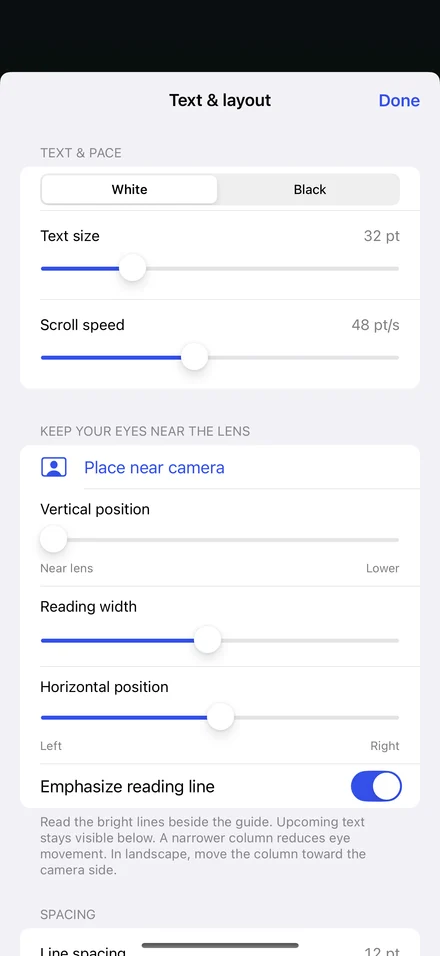
Move the words toward the lens so your eyes have less distance to travel. Choose the text size, width, and position that feel right for you.
White text or black. Faster or slower. A brighter camera preview. Make the setup fit the way you speak.
Explore reading controlsA breath.
A beat.
A better delivery.
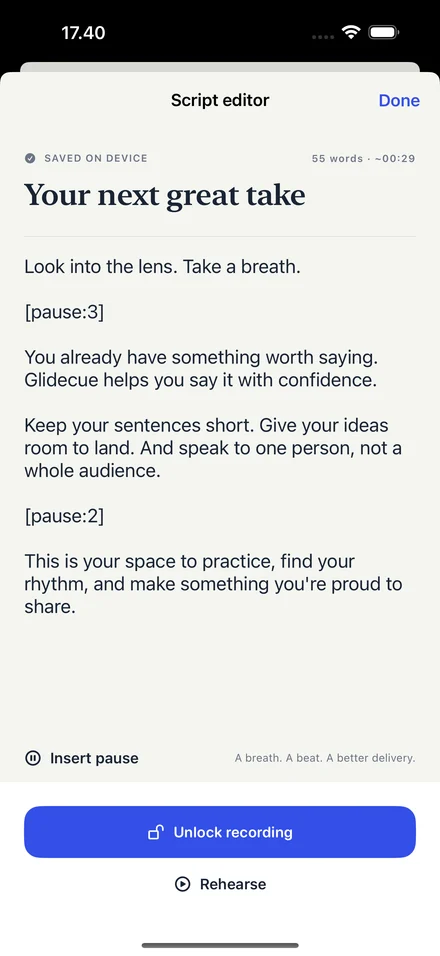
Write or import your talking points. Insert a timed pause when an idea needs a moment to land.
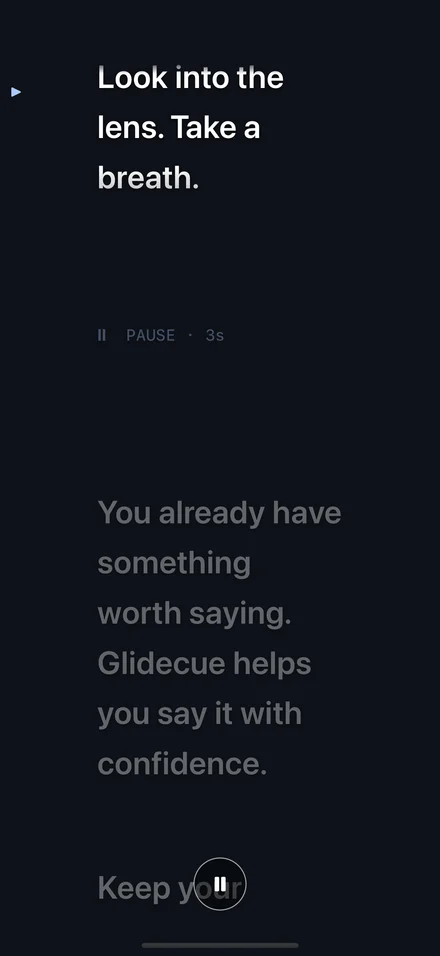
The text holds. During recording, the camera keeps rolling. You stay in the moment.
Write for your own voicePractice freely.
Record when ready.
Try the words. Find the pace. Check your framing with a live camera preview. Rehearse as often as you like, for free.
Ready for a take? Unlock recording once. Read over the full camera preview while the extra controls disappear, then save and share a clean video.
See free and Pro- 01
Write it down.
Start a script or import a text file. Add pauses.
- 02
Find your rhythm.
Rehearse with or without the camera preview.
- 03
Make your take.
Record with Pro. Review, export, and share.
Your words stay yours.
No account, ads, or tracking. Scripts and recordings stay on your device until you choose to share them.
Our approach to privacyBetter takes start here.
How to keep your eyes near the camera
A few small layout changes can make reading a script feel more like speaking to one person.
4 min read02SCRIPT WRITINGWrite a script you can actually say out loud
Turn written talking points into short, useful phrases—with room for a breath.
4 min read03YOUR FIRST TAKERecord a talking-head video with your iPhone
A practical checklist, from your first rehearsal to a clean exported take.
5 min readBefore your
first take.
What can I do for free?
All script editing, text-file import, timed pauses, text and layout controls, and unlimited rehearsal are free. You can rehearse with a live front-camera preview or with the camera off.
How much does recording cost?
Glidecue Pro unlocks unlimited video recording with one in-app purchase. The planned US price is $20. There is no subscription. Local prices are shown by the App Store at purchase.
Can I keep the text close to the camera?
Yes. Choose Place near camera in Text & layout, then adjust the reading width, vertical position, and horizontal position. The reading-line emphasis helps you follow the words near the lens.
Will the text appear in my saved video?
No. Your exported video contains the camera image and audio, without the script overlay or a Glidecue watermark. Recording requires Glidecue Pro.
Does Glidecue follow my voice?
No. Scrolling uses the speed you choose, with timed pauses and a manual hold control. Voice-follow scrolling, automatic captions, and video trimming are not included.
Something to say?
Make it yours.
Unlimited rehearsal. One purchase to record.
A little more confidence in front of the camera.